
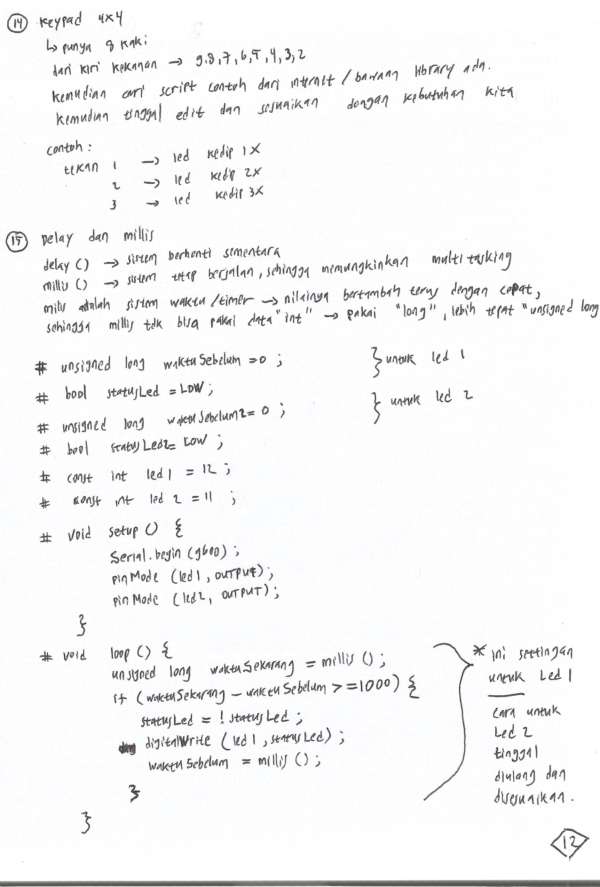
### Keypad 4x4 ###
#include <Keypad.h>

const byte ROWS = 4;
const byte COLS = 4;
const int led=10;

char hexaKeys[ROWS][COLS] = {
  {'1', '2', '3', 'A'},
  {'4', '5', '6', 'B'},
  {'7', '8', '9', 'C'},
  {'*', '0', '#', 'D'}
};

byte rowPins[ROWS] = {9, 8, 7, 6};
byte colPins[COLS] = {5, 4, 3, 2};

Keypad customKeypad = Keypad(makeKeymap(hexaKeys), rowPins, colPins, ROWS, COLS);

void setup(){
  Serial.begin(9600);
  pinMode(led,OUTPUT);
}

void kedip(int jumlah){
  for(int i=1; i<=jumlah; i++){
    digitalWrite(led, HIGH);
    delay(500);
    digitalWrite(led, LOW);
    delay(500);
  }
}


void loop(){
  char customKey = customKeypad.getKey();
  switch(customKey){
    case '1' :
    	kedip(1);
    	break;
    case '2' :
    	kedip(2);
    	break;
    case '3' :
    	kedip(3);
    	break;
    default:
    	break;
  }
  if (customKey){
    Serial.println(customKey);
  }
}
### delay dan millis ###
// C++ code
//

const int led1=12;
const int led2=11;
unsigned long waktuSebelum1=0;
unsigned long waktuSebelum2=0;
bool statusLed1=LOW;
bool statusLed2=LOW;

void setup()
{
  Serial.begin(9600);
  pinMode(led1, OUTPUT);
  pinMode(led2, OUTPUT);
}

void loop()
{
  unsigned long waktuSekarang1=millis();
  if(waktuSekarang1-waktuSebelum1>=1000){
    statusLed1=!statusLed1;
    digitalWrite(led1, statusLed1);
    waktuSebelum1=millis();
  }
  unsigned long waktuSekarang2=millis();
  if(waktuSekarang2-waktuSebelum2>=500){
    statusLed2=!statusLed2;
    digitalWrite(led2, statusLed2);
    waktuSebelum2=millis();
  }
}
Source : Youtube Life Tech